自定义消息通道
系统内置六种消息通道
- 提醒:发送到门户小铃铛的消息
- 门户:发送到消息中心未读消息的消息
- 企业微信:发送到企业微信的消息
- 钉钉:发送到钉钉的消息
- 短信:发送到手机的短信
- 邮件:发送到邮箱的邮件
系统支持采用自定义消息通道的方式,给其它应用发送消息
添加自定义消息通道
在企业门户中,打开“消息中心→自定义消息通道”,添加消息通道,输入名称、编码、地址,如下图所示
- 消息通道地址支持两种格式
- 绝对地址:以 http: 或 https: 开头
- 微服务地址:以“/服务名”开头
- 消息通道编码不能包含 sms
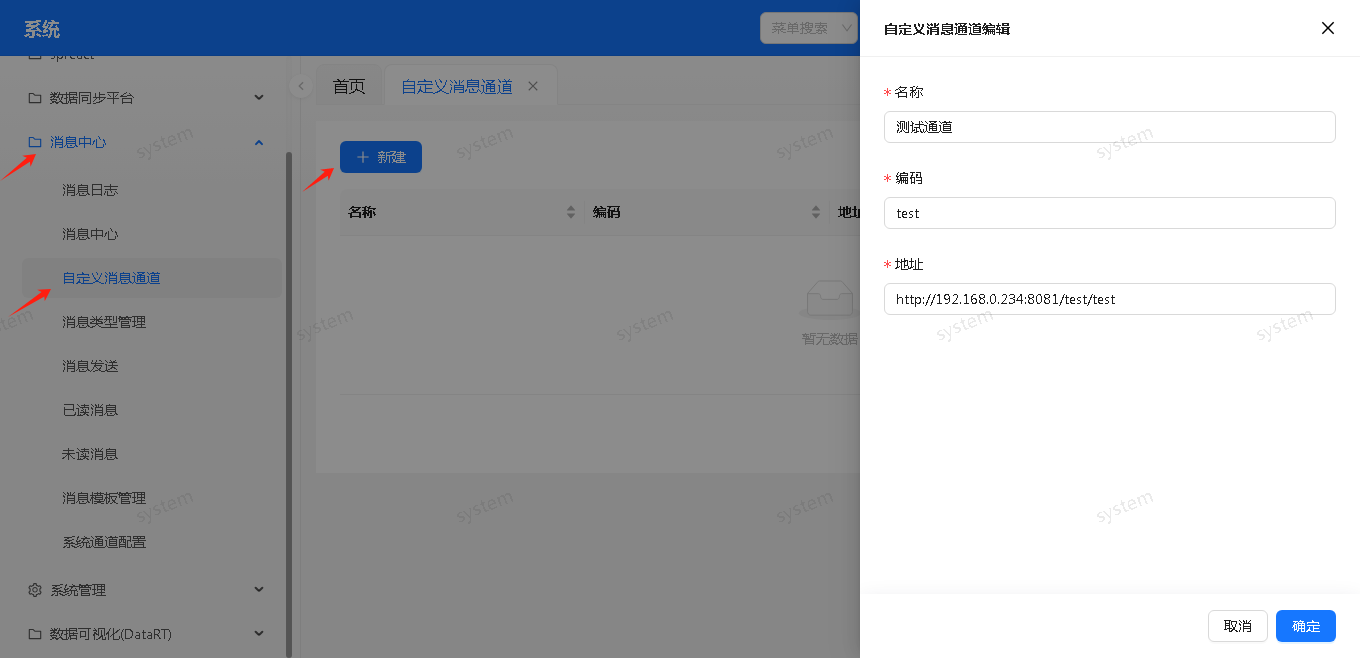
实现自定义通道接口
自定义通道接口需要符合以下规范:
method: post
request body(application/xml):
{
    "template": "",        //消息模版 id
    "code": "",        //消息编码
    "message": ""        //消息内容,JSON 格式
    "channel": "",        //消息通道编码
    "url": "",        //查看消息地址
}

response(application/json):
{
    "success": true,    //取值范围 true, false
    "message": ""        //成功或错误信息
}
其中 message 参数内容包括发送者、接收者和参数,格式如下
    {
        "senderId": "发送者 ID",
        "senderName": "发送者姓名",
        "receiverId": ["接收者 ID"],
        "receiverName": ["接收者姓名"],
        "params": {//发送消息时传入的 params
            "title": "123456"
        }
    }
常见错误
- No message available:自定义通道的地址设置的不对
- 消息模板 XXX 未指定短信模板时,不能使用短信方式
- 消息通道编码不能包含 sms,会被认为是短信
查询消息模版中的标题和内容
自定义通道接口接收的参数中,template 代表消息模版 id,查询消息中心的消息模版表,获取消息模版中定义的标题和内容模版,将其中的${参数名}替换为参数值,即形成完整的消息标题和内容。从自定义通道接口中获取消息模版 id,并根据消息模版 id 获取消息模版的标题和内容的代码如下
public String newChannel(String message) throws Exception {
    //获取传入的消息模版id
    JSONObject messageJson = JSON.parseObject(message);
    String messageTemplateId = messageJson.getString("template");
    //查询消息模版
    DbrestWrapper<?> wrapper = (DbrestWrapper<?>)new DbrestWrapper <String>("message", "main", "messageTemplate");
    wrapper.eq("fid",messageTemplateId);
    DbrestResult ret = DbrestUtil.get(wrapper, null);
    //获取标题和内容模版
    JSONArray jsonArr = ret.toJson().getJSONArray("result");
    JSONObject json = jsonArr.getJSONObject(0);
    String title = json.getString("ftitle");
    String content = json.getString("fcontent");
}